Link Updated!! Link Updated!! 1.31.2015 at 9:07 PM 1.31.2015 at 9:07 PM Yaah, finally I can updated two broken links here. Sorry it's took a long time, blame my laziness (っ´▽`; )っ So here's some change I'd made so far:  Molang Desktop : actually I forgot to saved the custom file I made to my drive and it's lost when I re-installed my old PC, but like I said I just made a custom. So what I can give you here was the base I used Molang Winamp Skins : done re-upload the file, so enjoy about the Eye Coloring Tutorial, it's because I uploaded it on my old Deviantart account which already deactivated because I move to pixiv now. I'm gonna make a new one when I got some free time since my coloring style changed too~ Changed my banner too, go to my links section to see it (੭ु。╹▿╹。)੭ु⁾⁾ Molang Desktop : actually I forgot to saved the custom file I made to my drive and it's lost when I re-installed my old PC, but like I said I just made a custom. So what I can give you here was the base I used Molang Winamp Skins : done re-upload the file, so enjoy about the Eye Coloring Tutorial, it's because I uploaded it on my old Deviantart account which already deactivated because I move to pixiv now. I'm gonna make a new one when I got some free time since my coloring style changed too~ Changed my banner too, go to my links section to see it (੭ु。╹▿╹。)੭ु⁾⁾Well I'm planning on changing my banner once a year tho, I'm easy to get bored with my designs but always slacking to make a new one ( ̄□ ̄;) Manga Application 4.09.2014 at 6:31 PM
So yeah, sorry for late answer (again) because I must and always study all new 15 Kanji every weeks from my very kind hearted sensei
 From karuchan question about Manga application, there's some application you can use to make a digital manga--- Adobe Photoshop I found most of Indonesian mangaka use Adobe to make their digital manga. The series of Adobe is depends on you. And I never move on from CS3 Adobe series if you want to know hahahahaha  You need to download some of brushes or patterns things for screentone since Adobe don't have it Manga Studio Personally I don't know how to use this manga software. Too much tool and I don't know what to use lol. But in Manga studio you can choose many screentone without download it first. Paint Tool SAI I dont know if somebody use it to draw manga or not, but I do  Just some 4 koma hahaha Just some 4 koma hahahaI more enjoy drawing digital thing with SAI, but always ended giving some final touch or background in Photoshop. I think it'll better if you did not just stuck with one application since every software has it plus and minus option~ That's some software I know to make digital Manga. Go explore other software for more experience  I'll come again with review of Area-X otome game (ノ´ヮ´)ノ*:・゚✧  Labels: Ask Posted by はな ♥ 1 comments Rilakkuma!! 3.17.2013 at 7:32 AMKawaiilovah: hey juz walking by~ Yes, I do! I really, really love Rilakkuma!  That's some of my Rilakkuma collections °˖✧◝(⁰▿⁰)◜✧˖° I took some photographs for it!  
Took from different angle of it!

My fav Rilakkuma daily planner!

Correction tape and nail clipper =v=

Top of the gel pen~

Korilakkuma Bee series figurin. Behind of it my birthday gift, a photo frame! >v<

Recently bought this plush strap. It's from french series~
Labels: Ask, cute, Cute KAWAII Stuff, life, rilakkuma Posted by はな ♥ 4 comments Answer Post #10 2.06.2013 at 4:59 PM Eriska Sitanggang: hey i love your cute blog :3 i want to ask you where did you download molang deskop?? :3 Well, I made it by myself. Visit my previous post about it! [link] Luna: hmm... i have a request... can you post some emoticons just like in your post (ex: (• ˆ⌣ˆ •) )please Since I'm too lazy to write it here... just check this site [link] whii: ehh gomen saya mo nanya lagi, itu lagu di blog anda apa ? :3 mo donlod Kalau lagu sebelum ini judulnya Find The Way by Mika Nakashima (• ▽ •)◞ Bunearyy: Uhh i lub your blog *-* but can i ask how do you make your blog theme and layout like dat~ ? o: I create the blog template/skins code on notepad and preview it~ Labels: Ask Posted by はな ♥ 0 comments Answer Post #9 1.25.2013 at 4:23 PM Dae Hyun: so cute theme . can i ask you ? are u using a tablet ? is where did you get cutie theme in ur computer like mozila,chorme,ps icon ? Well, I'm a mouse user. I'm mostly use mouse for all my art~ Labels: Ask Posted by はな ♥ 1 comments Answer Post #8 1.07.2013 at 6:48 PM Serenity Dreamer: Oh I'm sorry, but I can't be of no help.. I dunno much about these things.. hehe.. ;DD but it can be in deviantart right? one more question; How did you make your blog eco-friendly? ;D It's simple! Just copy this code on your blog~~ Serenity Dreamer: Asuka Izumi is a manga? ;D I'd like to read it tooo.. What is it about? ;3 Asuka Izumi-san is a mangaka. I love read her manga. Specially Shinigami No Ballad and Prince Of Lizard Momoka~Chan: Could you make me a template, please?? Or at least give me a code of a template you don't use anymore? I've tried very hard making a template and finding but i lost hope... Thank you! Your the best ^^ Ah! Sorry, I dun have time now. I must focus to my final exam >.< Try search your basecodes on google or blogskins. But not all of skins there avail to use as a basecodes. You must ask permission to the creator of the skins :3 Labels: Ask Posted by はな ♥ 4 comments Vote For My Blog Contest! 1.06.2013 at 4:37 PM Hi guys! Like I said in my prev post, I wanna do a blog contest!! But I'm still dunno what kind of contest that I mus do... So, I want you all my blog reader, vote for my upcoming contest. You can vote once per day. So please, don't vote in other option if you have choose one. But you can vote your choice again so it'll win! Option I Give: 1. Answering Question I'll give some question and you mus answer it! I'll choose the best and unique answer one~~ 2. Creating Banner For My Blog You must create banner for my blog. You can use any image. But I don't want you use image who protected with copyright! Like image in DeviantArt.com, Pixiv.com, Zerochan.net, and Anipan.com. Must include text "p i n k u r i i" or "Hana" or "Hana. S" there 3. Cutest Blog Design Design your blog as cute as possible but keep it light, okay? 4. Bag Meme Contest Show me what inside your bag! You can just take a photo of it. 5. Drawing / Doodling Draw something about my blog. You can try draw a fan-art from my mascot, Setsuna Kakujitsusei 6. Others Tell me if you want other contest in comment.  Answer Post #7 1.04.2013 at 5:46 PM Answer Post #7 1.04.2013 at 5:46 PM Momoka~Chan: haii it's me again!! Thank you so much for answering my question, I am eternally grateful ^^ Sorry for bothering you but, how did you make your template!! i just adore everything you have on your blog! Oh and, how do you get the music? I made ith notepad, and sometimes use Dreamweaver to see the preview ( ・ω・)ノ I've answered question like this. Go to my post Tutorial: Add Music To Blogskins Serenity Dreamer: IS this finish? ;DD hehe.. coz I'd love to have one of your drawings.. XD I'm still dunno what contest that I must do :/ Any suggestion? Labels: Ask Posted by はな ♥ 2 comments Answer Post #6 1.03.2013 at 7:50 PM Momoka~Chan: How did you get your template? Did you create it or get it? Can you please tell me? Thank you so much >O< Your blog is the best!!!!!! My template? Well I made this by myself :3 But I got many inspire stuff from Blogskins.com, Google.com (grand-pa!), and other site which you can find blog templates > u <. Thanks you for supporting my blog ; w ; leyfzalley Gonzalez Melendez: Esta Precioso ... donde me puedo descargar los skins q estas usando....? Umm, sorry... I just understand english ; w ; Labels: Ask Posted by はな ♥ 1 comments Tutorial: Add Music To Blogskins 12.29.2012 at 12:32 PM I made this tutorial based on this question: New: "I got a Question, how did you made the song on your Blog?" Sorry since I use blogskins for my blog, so I'll create this tutorial for blogskins. Actually, you can apply this to blogger template :3  First, you must know the HTML code of your song. I use Dropbox to get the code. You must download it first. First, you must know the HTML code of your song. I use Dropbox to get the code. You must download it first. After you get your music code, copy this to your blog template: After you get your music code, copy this to your blog template:<object type="application/x-shockwave-flash" data="http://flash-mp3-player.net/medias/player_mp3_mini.swf" width="200" height="20"> That's all! Simple right? Well, I forgot what site that I use to add this music player... So I just copy that code from my blog template~ Answer Post: Momoka~Chan 12.28.2012 at 8:15 AM Momoka~Chan: "How can I ask you a question?" Well, it's simple. You can leave your question on comment in any post, or just leave it to tagboard. The tagboard is more private since just me who can view all inbox. Just choose which better for you ^^. And don't worry, I'll reply your question asap _〆(゜▽゜*) Labels: Ask Posted by はな ♥ 0 comments About Blog Contest 12.26.2012 at 8:43 AM Hi guys, I'm thinking bout making a blog contest. Who interest? I'll give my drawing as the prize. What do you thing? I really need help here >.< I want give my blog readers something. Since I just can drawing so I give a drawing too ∑(゚∇゚|||)!! Hahaha. Sorry for bothering you guys with this dummy question... I really want do a contest ( ´ ▽ ` )ノ Please comment bellow and gimme an advice. Maybe 'bout what contest I must do and what prize(s) I must give~ I'll wait for your comment!!(・∀・) Answer Post #5 12.22.2012 at 11:26 AM Hi guys! Sorry for being inactive for some weeks =w=; And I just found some readers is asking questions. I'll answer here ^3^ Clown Served: Mau tanya blh..? cara ngeblend warna kulit pake watercolour block kyk shisshou it gmana tahapny, y? aku dri dlu ngeblend wrna kulit g prnah brhasil.. TT^TT Hana pake warna kuning kecoklatan. Mulai dari yang muda, terus dibiarin kering dulu. Kalau udah kering, baru ditumpuk sama gradasi warna yg lebih gelap =w=v Serenity Dreamer: Wow! Mashaallah! You can also do it with real art brushes! ^_^ eheh!! I'd like to see the final outcome.. ;>> Wow! Thankyou for being interested with my art. I'll try to finish it and hope I don't do a mistakes ; w ; Serenity Dreamer: I like the way it looks like.. very simple.. ;> I have a question though.. How did you make your cbox? ;D Coz I can't see if I sent you the message or not.. hehe.. ;D It's simple. Go to your CBOX code, then change the first "line-height" to "0". Serenity Dreamer: Now tinierme isn't available.. ;( I'd like to see how it is done... Too bad.. >w< btw, they're cute.. your OCs? ;D What's an OC btw? hehe.. :D OC is Original Character that you made based on your imagination and didn't copy any anime. OC is your own anime character ^^ Labels: Ask Posted by はな ♥ 6 comments Answer Post: Riri 11.23.2012 at 9:09 AM Your molang desktop is so cute! If you don't mind me asking, how did you get it like that?
Wow! Thanks Riri. I've post an answer for question like you asked. Visit my other blog post Ask: Desktop Widget.
I post where you can download the basic widgets that I use to make my Molang desktop. You must install te XWidget first, then download each widget and install it on your desktop! ^^
Labels: Ask Posted by はな ♥ 0 comments Answer Post: Luna 11.04.2012 at 7:27 AMcan you answer one question? how to make that manga girl? Umm... actually I dunno how to teach other people ヽ( °◇°)ノ But I have some tips from my How To Draw Manga book. It's just a basic~!   2. The body. For the girl is always make a △ shape (wider at the waist), then the guy ∇ shape (wider at the shoulder).  3. The hair style. I think you had know bout girl and guy hair style, right? That's the girl hairstyle. Labels: Ask Posted by はな ♥ 0 comments Answer Post: Mochio 10.25.2012 at 11:29 AM I dare you to list every anime you've watched >:D > U < Ehehehe, okay then~! I'll post anime that I've watched for this month~~ Search the episode by yourself, ok! (⌒▽⌒ゞ 1st Sword Art Online  2nd Hyouka  3rd Mirai Nikki  4th Black★Rock Shooter  5th TSUBASA Shunraiki  Molang Chrome Theme: Wrong File 10.15.2012 at 7:12 PM Molang Chrome Theme: Wrong File 10.15.2012 at 7:12 PMThanks for reading my message n.n but when I download the theme for google I get the skin for winamp xd or maybe it's my computer :/ I'm sorry to bother you >.< (p.s. i love your artwork *o* and your desk omg kawaii ♥.♥)
Kyaah~! Sowwy >.<
I dun noticed that I upload the wrong file on DA! Thanks for tell me ^^ Well, I've changed the file and I'M SURE this is the RIGHT FILE. Visit it in DA again HERE How To Install: ● Extract RAR file ● Go to http://www.themebeta.com/chrome-theme-creator-online.html ● Choose Upload and edit, browse the polkadot_molang.crx from file ● Then, choose Pack and Install Labels: Ask Posted by はな ♥ 0 comments Ask: Google Chrome Theme RAR 10.14.2012 at 7:03 AMplease can you make google chrome theme did you do in rar file, is that I love, sorry my english :/ 
Well, I have change the file from ZIP to RAR ^^. Download the theme HERE and click DOWNLOAD FILE on the top right~
Labels: Ask, Cute Widgets Posted by はな ♥ 0 comments Ask: Desktop Widget 10.11.2012 at 10:43 AMHello! 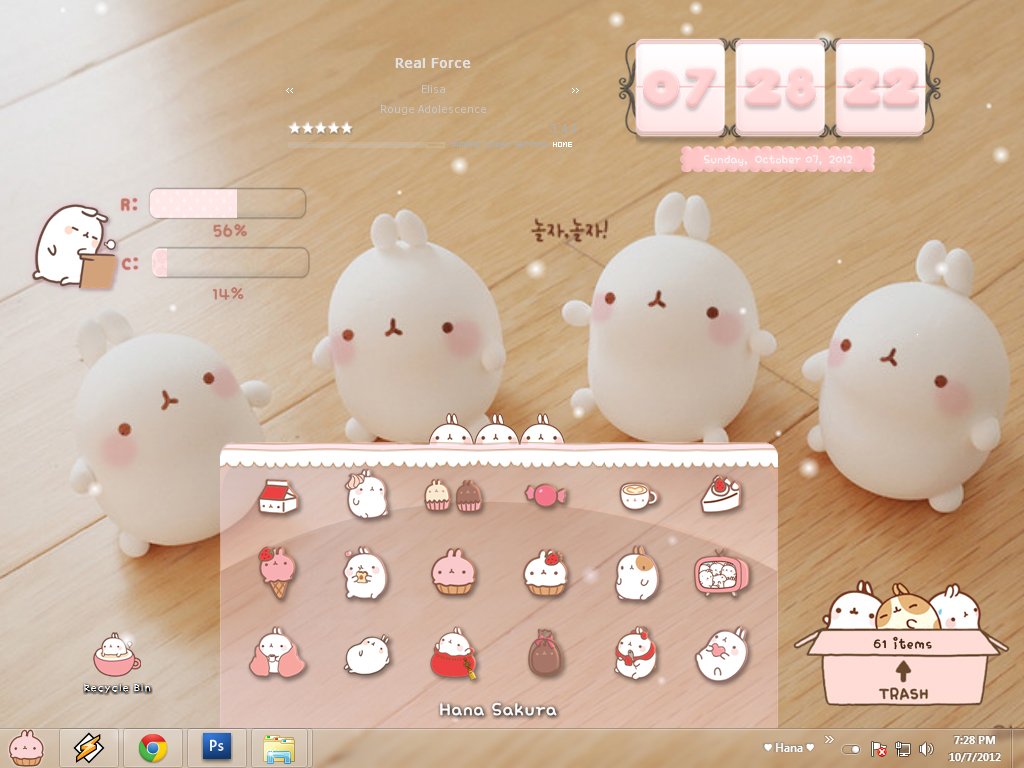 Okey, actually I didn't post my desktop widget yet. But all of my desktop widget is based on DeviantArt~! And I use xwidget for applying all. Here I'll give u all links: ★ Lady Clock by ~MarushitaNeko ★ Pink Ram & CPU by ~angelyviverosmoreno ★ Trash Status by ~may0487 ★ Pink Menu by ~MarushitaNeko If anything that u didn't understand, just ask me ^^ Labels: Ask, Cute KAWAII Stuff, life Posted by はな ♥ 11 comments Question #4 8.11.2012 at 7:58 PM
Hyaaawn!
Sorry cause I didn't make any post from last month >.< I have to finish my school homework. But now, my school just entering holiday again ^0^/ Ok! Now it's time for answering question on Fromspring~ Mew ask: Hohoho, I recently watch an AWESOME anime. It's Sword Art Online. I really, really recommended this anime, cause It's an Anime Of The Year =w=  And for font, it's called short stack. I use some script for use it on my blog =w= Someone ask: Hmm, I dun have a special 'recipe'. But I always do observe - copy - modification. Not a copy cat :3 Seeing other peop blog for inspiration. Don't forget, make your blog with your original stuff or image ~^^* Gwnives ask:Actually, I've a lot of fav anime >w< like Sword Art Online, Black Rock Shooter, Fairy Tail, Hyouka, One Piece, Soul Eater, Pandora Hearts, Nurarihyon No Mago and many more . . . Someone ask:Yup, I have! But I didn't use it anymore :/ If you want visit it just go to Apple Maple tumblr~! Labels: Ask Posted by はな ♥ 0 comments |
ようこそ! 誕生日:12月01日 目色 / Eyecolor:茶色 『 Brown 』 お住まいの地域:Indonesia ブログジャンル:美術ブロガー • 漫画家 • リラックマファン♥ ♥/l、 (゚、 。 7 l、 ~ヽ じしf_, )ノ View my complete profile LinksLulu :: Whii :: KawaiiLovah :: AqilaF :: Lilaa :: Apple :: Leepy :: Pelont :: Angel :: Yowa :: Shiro Usagi :: Aurellia :: Karuchan :: Atsuki :: Ibdati :: Atsuki :: Miss Lia :: Jassarah :: Rui View more links DisclaimerCopyright © r i z u m a r y 2014 All Right Reserved.  FAQ Can I have commissions? What do you use to create art? What song did you use for BGM on your blog? Link/Banner exchange? FAQ Can I have commissions? What do you use to create art? What song did you use for BGM on your blog? Link/Banner exchange?View detailed FAQ Tagboard Please read FAQ before asking question No spam and harsh word please NO ADVERTISE or it'll be deleted Archives Upcoming Tutorial Hair coloring tutorial [view] Cleaning line from photo result How to draw Head [view] Skin coloring tutorial Eye coloring tutorial How to draw Head (part 2) Cloth Shading 頼む Fell free to ask me anything Read FAQ first before asking anything Please WRITE YOUR NAME! Please read FAQ before asking question No spam and harsh word please NO ADVERTISE or it'll be deleted Archives Upcoming Tutorial Hair coloring tutorial [view] Cleaning line from photo result How to draw Head [view] Skin coloring tutorial Eye coloring tutorial How to draw Head (part 2) Cloth Shading 頼む Fell free to ask me anything Read FAQ first before asking anything Please WRITE YOUR NAME! Your lucky number:  •••
•••

|